Updated October 2026. The vectorized implementation now uses a reusable class vocabulary rather than an array indexed up to the largest numeric label. It supports negative and noncontiguous labels. The timing example uses repeated measurements. Download the tested helpers. The figure below is the original 2021 result, not a new benchmark of the corrected code.
import numpy as npIn a lot of artificial intelligence applications, specially in supervised learning classification problems, where the labels for each of the datapoints are available, we often have a one-dimensional array containing the classes of each of the datapoints. Depending upon the machine learning algorithm we are going to apply to our dataset for classification, we might need to one-hot encode our labels.
What is One Hot Encoding?
Say, we are given a labels array like,
>>> Y=np.array([12, 8, 4, 4, 11, 0, 10, 10, 1, 8]).reshape(-1,1)
>>> Y
array([[12],
       [ 8],
       [ 4],
       [ 4],
       [11],
       [ 0],
       [10],
       [10],
       [ 1],
       [ 8]])
Where each row contains the class number of the corresponding row for the datapoint X. Note that, in our example there are 7 unique classes, namely, 0,1,4,8,10,11,12 .One hot encoding for the above array Y will be,
>>> encoded, classes = one_hot(Y)
>>> encoded
array([[0., 0., 0., 0., 0., 0., 1.],
       [0., 0., 0., 1., 0., 0., 0.],
       [0., 0., 1., 0., 0., 0., 0.],
       [0., 0., 1., 0., 0., 0., 0.],
       [0., 0., 0., 0., 0., 1., 0.],
       [1., 0., 0., 0., 0., 0., 0.],
       [0., 0., 0., 0., 1., 0., 0.],
       [0., 0., 0., 0., 1., 0., 0.],
       [0., 1., 0., 0., 0., 0., 0.],
       [0., 0., 0., 1., 0., 0., 0.]])
Where in each row has only one column set to 1 representing the class to which the datapoint belongs. For example, the first row has the last column set to 1. Which represents the column of the class ’12’. Which would mean we would also require the class to column mapping along with the one hot encoding. Something like,
array([[ 0],
       [ 1],
       [ 4],
       [ 8],
       [10],
       [11],
       [12]])
Here the row number of the class represents it’s column in the one hot encoding. It is simply a sorted order of all unique classes in Y.
The easy solution to the easy problem(For loop)
def one_hot_for(Y, classes=None, dtype=np.float32):
    labels = np.asarray(Y).reshape(-1)
    vocabulary = np.unique(labels if classes is None else np.asarray(classes).reshape(-1))
    mapping = {value: index for index, value in enumerate(vocabulary)}
    encoded = np.zeros((len(labels), len(vocabulary)), dtype=dtype)
    for row, label in enumerate(labels):
        if label not in mapping:
            raise ValueError("A label is absent from the supplied class vocabulary")
        encoded[row, mapping[label]] = 1
    return encoded, vocabulary.reshape(-1, 1)
Vectorized encoding with a class vocabulary
def one_hot(Y, classes=None, dtype=np.float32):
    labels = np.asarray(Y).reshape(-1)
    vocabulary = np.unique(labels if classes is None else np.asarray(classes).reshape(-1))
    indices = np.searchsorted(vocabulary, labels)
    if len(labels) and (np.any(indices >= len(vocabulary)) or not np.array_equal(vocabulary[indices], labels)):
        raise ValueError("A label is absent from the supplied class vocabulary")
    encoded = np.zeros((len(labels), len(vocabulary)), dtype=dtype)
    encoded[np.arange(len(labels)), indices] = 1
    return encoded, vocabulary.reshape(-1, 1)
Speed comparison
Generating random labels and storing in a file
import random

file_name="randoms.txt"
with open(file_name,"w+") as random_labels:
    for i in range(10000):
        random_labels.write(str(random.randint(0,1000))+"\n")
The above code will generate 10,000 random numbers and store them on individual lines in the file randoms.txt
Script for comparing the two functions
import numpy as np
from timeit import repeat
import matplotlib.pyplot as plt
from numpy_tutorials import one_hot, one_hot_for

rng = np.random.default_rng(0)
labels = rng.integers(0, 1000, size=10000)
sizes = range(100, 10000, 100)
for function in (one_hot, one_hot_for):
    timings = []
    for size in sizes:
        batch = labels[:size]
        function(batch)  # warm up
        samples = repeat(lambda: function(batch), repeat=7, number=3)
        timings.append(np.median(samples) / 3)
    plt.plot(list(sizes), timings, label=function.__name__)
plt.xlabel("Number of labels")
plt.ylabel("Median seconds per call")
plt.legend()
plt.show()
Result
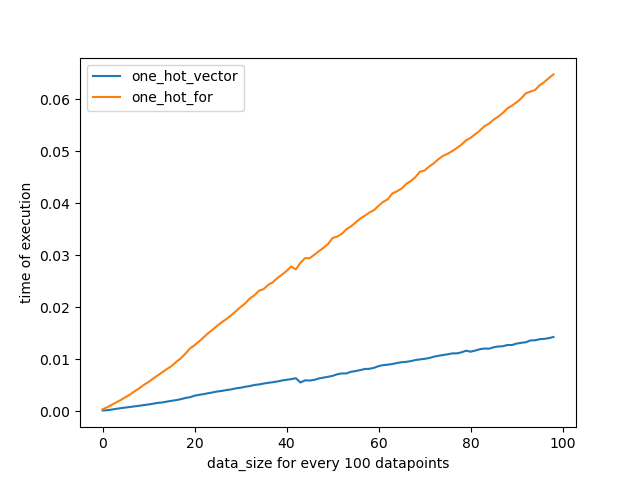
Additional notes
- Fit the class vocabulary on training labels and reuse it for other splits:
encoded, classes = one_hot(train_labels), thenvalidation, _ = one_hot(val_labels, classes=classes). Unknown classes raise an error. - A dense output uses
N × C × dtype.itemsizebytes. The float32 default uses four bytes per cell; many classes can make this costly. Consider sparse storage when appropriate. - Timing depends on input shape, class count, allocation, dtype, hardware, and measurement method. Repeated timings are measurements of this workload, not a universal ranking.
- Current tested source
Have a question or a different approach? I’d like to hear it.
Comments
Comments load as you reach this section. Sign in with GitHub to join.
Read or comment on GitHub ↗